REST APIs
Hyper Text Transfer Protocol

- HTTP is the protocol that is used on the web, originally created by Tim Berners-Lee in the 1990s
- Defines how clients (eg. browsers) connect servers by making requests about resources
- Resources are identified using Uniform Resource Identifiers
The Hypertext Transfer Protocol (HTTP) is a stateless application-level protocol for distributed, collaborative, hypertext information systems. (Fielding, Nottingham, and Reschke 2022)
Client-Server Model
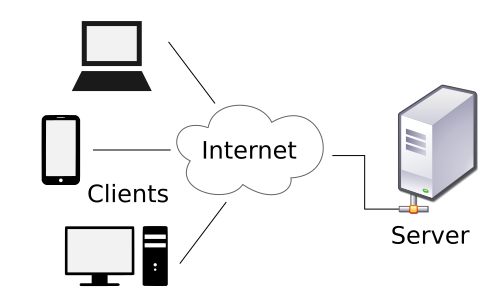
- In OOP, objects directly communicated with other objects by calling methods in the same program
- In a client-server model, clients make requests over a network and wait for the server to respond
- On the web, Application Programming Interfaces (APIs) define how those requests should be made
- Having an shared definitions allows separate applications to exchange data
REpresentational State Transfer
REST components communicate by transferring a representation of a resource in a format matching one of an evolving set of standard data types, selected dynamically based on the capabilities or desires of the recipient and the nature of the resource. Whether the representation is in the same format as the raw source, or is derived from the source, remains hidden behind the interface. (Fielding 2000)
- HTTP inspired an architectural style known as REpresentational State Transfer (Fielding 2000):
- Stateless: Each request is independent
- Text-based: Messages are human-readable
- Resource-oriented: Everything is a "resource" identified by a URL
- A representation is information that is intended to reflect a past, current, or desired state of a given resource
- Representations can be encoded in formats such as HTML, CSV, JSON, XML etc.
- REST APIs follow this architectural style of emphasising stateless, web-based applications
Writing Client-Server Code
Moving from a method call to a network request introduces some constraints that do not exist in local code:
- Slow: a method calls feel instant whilst a network requests can take varying amounts of time
- Unreliable: requests can time out, fail partway through, or never arrive
- Data Only: we can only send data, not other objects
- Stateless: REST is also stateless, so no history is remembered by the server
Uniform Resource Identifier
- A Uniform Resource Identifier contains information about where a resource is located and how to access it using a scheme as
httpsorhttp

| Component | Purpose | Example |
|---|---|---|
| Scheme | Protocol to use | https |
| Authority | Server address | nul-pdi.netlify.app |
| Port | Server port | Defaults to 80 or 443 |
| Path | Resource location | /api/books |
| Query | Parameters | genre=fantasy&author=klune |
| Fragment | Part of resource | #section |
HTTP Requests
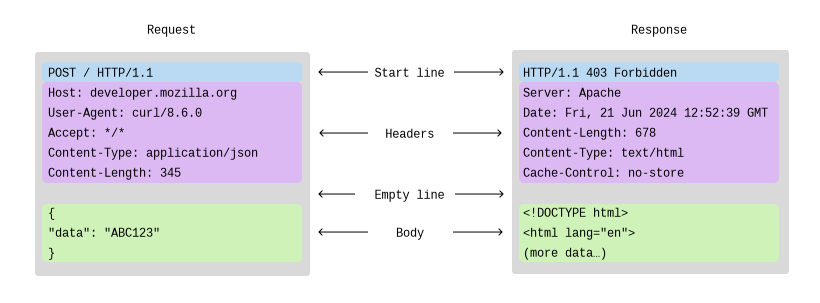
- HTTP messages are used to exchange resource representations between clients and servers
- Messages are text based and sent over TCP/IP sockets
- Typically TCP port 80 (HTTP) or port 443 (HTTPS) is used for web servers
- If an IP address is like your phone number, a TCP port is like an extension
Request Verbs
Clients use HTTP verbs to tell servers what action to perform along with headers and a message body
| Method | Purpose | Example Use |
|---|---|---|
GET |
Retrieve data | Fetch a book's details |
POST |
Create new data | Add a new book |
PUT |
Replace existing data | Update entire book record |
PATCH |
Partial update | Change just book's stock |
DELETE |
Remove data | Delete a book |
Response Status Codes
Servers respond with a status code indicating what happened, headers and message body
| Range | Meaning | Common Examples |
|---|---|---|
2xx |
Success | 200 OK, 201 Created, 204 No Content |
3xx |
Redirect | 301 Moved Permanently, 304 Not Modified |
4xx |
Client error | 400 Bad Request, 401 Unauthorized, 404 Not Found |
5xx |
Server error | 500 Internal Server Error, 503 Service Unavailable |
Data Interchange Formats
- HTTP interactions take place through exchanges of different representations of resources
- The format used for exchanging representations between server and client is agreed in advance
JavaScript Object Notation

- The most common data interchange format is JavaScript Object Notation (JSON)
- Derived from the object syntax used in JavaScript
- JSON is returned as text inside HTTP messages can be turned into a dictionary that we can use with Python
{
  "id": 1,
  "title": "Pachinko",
  "author": "Min Jin Lee",
  "year": 2017,
  "genres": ["Historical Fiction", "Family Saga"],
  "isbn": "978-1455563920",
  "stock": 14
}
eXtensible Markup Language

- XML is a markup language designed to store and transport data
- XML is widely used for configuration files, data exchange, and web services
- HTML is a specific application of XML, used for structuring web content
<?xml version="1.0" encoding="UTF-8"?>
<book>
  <title>Pachinko</title>
  <author>Min Jin Lee</author>
  <year>2017</year>
</book>
JSON Encoder and Decoder
- Data that we use in a program needs to be converted into format that can be transmitted over a network
- You cannot send a Python dictionary over HTTP for instance
- JSON is widely used as a text format for sending data, it looks like a Python dict
- Serialising converts an object into a string or bytes; deserialising converts it back into an object
- Python's built-in json module used for converting objects
json.dumpsserialises a Python object into a JSON stringjson.loadsdeserialises a JSON string back into a Python object
- Only basic types can be serialised: dictionaries, lists, strings, numbers, booleans and
None
The Requests Library

- The Requests library is a third-party library used to make HTTP requests in Python
- It has a friendly interface for interacting with HTTP servers
- Python has lower level standard library modules for making HTTP clients and servers
Install with:
uv add requests
Use with:
import requests

# Make a GET request
response = requests.get('https://nul-pdi.netlify.app/api')

# Check if successful
print(response.status_code)  # 200

# View response headers
print(response.headers['Content-Type'])  # application/json

# Parse JSON into Python list
data = response.json()
print(data['message'])
# Welcome to book collection API for Program Design and Implementation I
Getting a Resource with GET
- A
GETrequest is usually to read or retrieve a resource - The books endpoint can get a book using its id
- Errors with the request can be raised with
raise_for_statusso that we are aware of them - We can use the resource ID in the URL path to fetch a specific item:
import requests

book_id = 1

response = requests.get(
    f"https://nul-pdi.netlify.app/api/books/{book_id}",
    timeout=10
)

if response.status_code == 404:
    print(f"Book with ID {book_id} not found")
    book = None
else:
    response.raise_for_status()  # throw any request errors
    book = response.json()

if book:
    print(f"{book['title']} by {book['author']}")
    # Pachinko by Min Jin Lee
- A
404 Not Foundstatus means the resource does not exist. This is different from a server error (5xx) or a bad request (400). - The
timeoutargument tell requests to only wait 10 seconds for the server to respond
Query Parameters
- The books API can search for specific books by using query parameters on the books endpoint
- A query parameter is a way to pass additional information to a server as part of a URL
- The query comes after the path starting with the
?symbol - Each parameter is a key/value pair, and pairs are separated by the
&symbol
- The query comes after the path starting with the
Instead of building URLs manually, you can pass parameters as a dictionary using requests
# Manually constructed URLs are hard to read and error-prone
url = 'https://nul-pdi.netlify.app/api/books?genre=fantasy&author=TJ+Klune'

# Using a params dictionary:
params = {
    "genre": "fantasy",
    "author": "TJ Klune"
}

response = requests.get(
    "https://nul-pdi.netlify.app/api/books",
    params=params,
    timeout=10
)

# Requests handles URL encoding automatically
print(response.url)
# https://nul-pdi.netlify.app/api/books?genre=fantasy&author=TJ+Klune
Updating Resources with PUT
Use PUT to replace an existing resource entirely
book_id = 1

payload = {
    "title": "Pachinko",
    "author": "Min Jin Lee",
    "year": 2017,
    "genres": ["Historical Fiction","Family Saga"],
    "isbn": :"978-1455563920",
    "stock": 20  # Increased stock from 14 to 20
}

response = requests.put(
    f"https://nul-pdi.netlify.app/api/books/{book_id}",
    # Send body as JSON, and set content-type
    json=payload,
    # Operations that result in changes often
    # need authroisation
    headers={"Authorization": "Bearer 1234"},
    timeout=10
)

if response.status_code == 404:
    print(f"Book with ID {book_id} not found")
    updated = None
else:
    response.raise_for_status()
    updated = response.json()
PUT replaces the entire resource. You must send all fields, even those that haven't changed. Note that a PATCH method also exists to update part of a record.
Deleting Resources with DELETE
Use DELETE to remove a resource
response = requests.delete(
    f"https://nul-pdi.netlify.app/api/books/{book_id}",
    headers={"Authorization": "Bearer 1234"},
    timeout=10
)

if response.status_code == 404:
    print(f"Book with ID {book_id} not found")
else:
    response.raise_for_status()  # Raise for other errors
204 No Contentmeans successful deletion; the response body is empty404 Not Foundmeans the resource does not existDELETEis typically idempotent: deleting the same resource twice leaves the server in the same state, even though the second call may return 404- Performing an idempotent operation multiple times has the same effect on the server as performing it once
- Whether you delete a book once or five times, the end result is the same
GETandPUTare also idempotent, butPOSTis not
Handling Exceptions
- Network requests can be unreliable
- Potential failures should be anticipated, and specific exceptions caught using
tryandexcept
import requests
from requests.exceptions import RequestException, Timeout, HTTPError

def fetch_book(book_id):
    try:
        response = requests.get(
            f"https://nul-pdi.netlify.app/api/books/{book_id}",
            timeout=10  # Without this, the request could hang indefinitely
        )
        # Converts 4xx/5xx status codes into exceptions so that we can catch them
        response.raise_for_status()
        return response.json()
    except Timeout:
        # Specific errors come first
        print("Request timed out")
    except HTTPError as e:
        # Raised by raise_for_status() for 4xx/5xx responses
        print(f"HTTP error occurred: {e.response.status_code}")
    except RequestException as e:
        # The base class: catches any other requests error, e.g. connection failures
        print(f"Network error: {e}")

    return None  # Signal to the caller that no book was fetched
Class Exercises
These exercises use the PDI Books API at https://nul-pdi.netlify.app/api.
Start by creating a file called book_client.py with the following class. You will add methods to it as you go.
import requests
from requests.exceptions import RequestException, Timeout, HTTPError

class BookClient:
    def __init__(self, base_url: str):
        self.base_url = base_url  # e.g. "https://nul-pdi.netlify.app/api"
Explore the Collection
Add a method list_books to your BookClient that accepts an optional genre parameter:
def list_books(self, genre: str | None = None) -> list[dict]:
    ...
- Fetch all books from the
/booksendpoint and print the title and author of each on its own line - Then call the method again with
genre="Literary Fiction"and print how many results came back
Refer to the API documentation if you are unsure which parameters to use.
Add a New Book
Add a method create_book to your class that sends a POST request to the /books endpoint:
def create_book(self, title: str, author: str, year: int,
                genres: list[str], isbn: str, stock: int) -> dict:
    ...
Use your method to add a book using the bearer token 1234.
- Print the ID of the newly created book
- Add a
get_bookmethod that fetches a book by its ID, and use it to confirm the new book was stored correctly